 ZenCoder
Quick Start
Get ZenCoder running in under 5 minutes. Connect a local model and send your first chat.
zencoder-secrets.Pre-install setup
Install the tools ZenCoder uses as its AI backends. These steps work on macOS, Linux, and Windows.
1. Install Ollama (local AI, free)
- 1
Download Ollama
Go to ollama.com and download the macOS app, or use Homebrew:
brew install ollama - 2
Start the Ollama service
Ollama runs as a background service on
localhost:11434.Terminal 1bashollama serveℹ️On macOS, the Ollama app starts this automatically after install. - 3
Pull a coding model
We recommend one of these for coding tasks:
# Recommended: fast, great for code
ollama pull qwen2.5-coder:7b

# Alternative: general purpose
ollama pull llama3

# Verify it downloaded
ollama list
Expected output: model appears in the list with its size.
💡Free cloud models: Ollama also offers powerful cloud models (e.g.nemotron-3-super:cloud) that run on Ollama's servers at no cost. These require Ollama v0.12+ and a one-time sign-in:ZenCoder automatically pulls and launches cloud models — no manualollama signinollama pullneeded. - 4
Verify Ollama is running
curl http://localhost:11434/api/tags
# → {"models":[{"name":"qwen2.5-coder:7b",...}]}
2. Install LM Studio (optional alternative)
LM Studio is a GUI app that runs local models and exposes an OpenAI-compatible API.
- 1
Download LM Studio
Download from lmstudio.ai — macOS, Windows, and Linux supported. Install the
.dmgas you would any Mac app. - 2
Download a model
Open LM Studio → search for Qwen2.5-Coder or Mistral 7B → click Download. Models are stored in
~/.cache/lm-studio/models/. - 3
Start the local server
In LM Studio: Local Server tab → select model → Start Server.
The server listens on
http://localhost:1234/v1(OpenAI-compatible).
Install ZenCoder
Choose how you want to use ZenCoder — the CLI tools or the VS Code chat extension (or both).
Option 1 — CLI & zencoder-secrets
Installs zencoder, zencoderd, and zencoder-secrets in one step. The daemon is registered to start automatically on login.
macOS & Linux
curl -fsSL https://raw.githubusercontent.com/divyabairavarasu/zencoder-releases/main/install.sh | bash/usr/local/bin and registers zencoderd as a LaunchAgent (macOS) or systemd service (Linux).Windows (PowerShell)
irm https://raw.githubusercontent.com/divyabairavarasu/zencoder-releases/main/install.ps1 | iex%LOCALAPPDATA%\ZenCoder\bin and added to your user PATH automatically. The daemon runs as a scheduled task that starts on login. Restart your terminal after install so the new PATH takes effect.- 1
Open the REPL
zencoderYou'll see the ZenCoder banner and a
>prompt. Type a question and press Enter twice to send.> What does this code do? | ZenCoder: This code defines an HTTP server that... - 2
Check health
zencoder health
# → ZenCoder: service status is ok. Model: ollama/qwen2.5-coder:7b
Option 2 — VS Code Chat Extension
Get AI chat, inline completions, and context-aware suggestions directly inside VS Code.
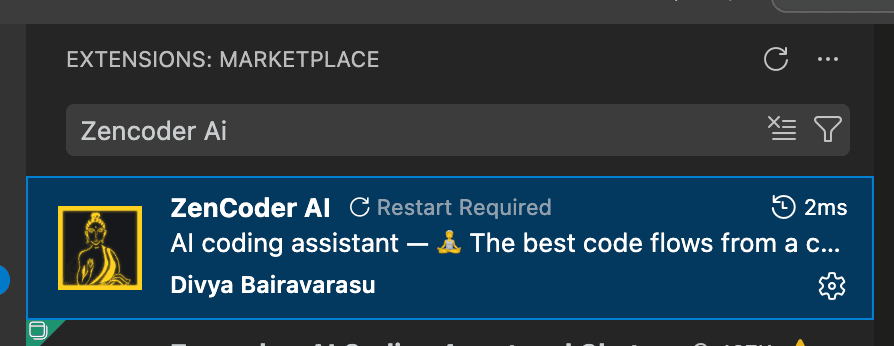
Zencoder AI
Search for Zencoder AI in the VS Code Extensions panel (Ctrl+Shift+X / Cmd+Shift+X) and click Install.
Cmd+Shift+P (macOS) or Ctrl+Shift+P (Windows/Linux), type ZenCoder AI Chat, and press Enter to open the chat panel and start using it.Add cloud API keys with zencoder-secrets (optional)
zencoder-secrets is installed automatically alongside the CLI. It is the most secure way to add your own cloud API keys — every key is stored encrypted on your local machine and never leaves your device.
zencoder-secrets only when you want to unlock a specific cloud model.How it works
You register a provider endpoint and model once. ZenCoder handles routing — you just pick the model in the REPL.
# General syntax
zencoder-secrets add -url <provider-base-url> -model <model-id> -alias <your-key-name>
# → Enter API key: [hidden — input is masked]
# → BYOK provider registered.
NVIDIA NIM — featured example
NVIDIA NIM provides free API access to top-tier models including Llama, Mistral, and Nemotron. Sign up at build.nvidia.com to get a free key (no credit card required).
# Add an NVIDIA NIM key
zencoder-secrets add -url https://integrate.api.nvidia.com/v1 \
  -model nemotron-3-nano-30b-a3b \
  -alias nvidia-key1
# → Enter API key for nvidia (alias: nvidia-key1): [hidden]
# → BYOK provider registered.
# → Example model: nvidia/nemotron-3-nano-30b-a3b

# Add more keys for different models (ZenCoder load-balances across them)
zencoder-secrets add -url https://integrate.api.nvidia.com/v1 \
  -model llama-3.3-70b-instruct \
  -alias nvidia-key2

# Verify your keys
zencoder-secrets list

# Test a key is working
zencoder-secrets test -provider nvidia -alias nvidia-key1/model and select your NVIDIA model from the list.Managing keys
| Command | What it does |
|---|---|
| zencoder-secrets add -url <URL> -model <M> -alias <name> | Register a key for any provider endpoint |
| zencoder-secrets list | List all registered keys (values masked) |
| zencoder-secrets test -provider <P> -alias <name> | Send a probe request to verify the key works |
| zencoder-secrets delete -provider <P> | Remove all keys for a provider |
| zencoder-secrets delete -provider <P> -alias <name> | Remove a specific key by alias |
/help to see all slash commands.Essential slash commands
| Command | What it does |
|---|---|
| /help | Show all available commands |
| /model | Open interactive model picker (arrow keys to navigate) |
| /model ollama/llama3 | Switch to a specific model immediately |
| /models | Alias for /model |
| /clear | Reset the current session's conversation history |
| /quit | Exit the REPL |
| /byok url=<URL> key=<KEY> | Register a custom BYOK endpoint |
Next
CLI Reference — every command and flag